
MCP server
@puth/mcp lets Claude Code, Codex and other MCP clients use a browser through Puth: explore an application, validate behavior, and draft PHP or Laravel tests. Agents keep using their own editor and terminal tools to write files and run test suites.
It connects to a running Puth instance and never starts one. Each agent session gets its own context, so it can share an instance with test runners without affecting them.
Setup
Start Puth, then point your MCP client at the server over stdio.
| Variable | Default | Purpose |
|---|---|---|
PUTH_INSTANCE_URL | http://127.0.0.1:7345 | Puth instance to connect to |
PUTH_APP_URL | none | Base for relative URLs, which never resolve against the current page |
PUTH_ARTIFACT_DIR | .puth/agent-artifacts | Screenshots and snapshots, in one folder per session |
Keep secrets out of committed configuration. Add the artifact directory to your .gitignore.
Addressing
The two URLs are resolved in different places:
PUTH_INSTANCE_URLis used by the MCP server, so it must be reachable from where the server runs.PUTH_APP_URLis opened by the browser, so it must be reachable from where Puth runs Chrome. If Puth runs in a container,http://localhost:8000points at that container.
In this repository's Compose environment:
| MCP server runs | PUTH_INSTANCE_URL | PUTH_APP_URL |
|---|---|---|
| On the host | http://127.0.0.1:7345 | http://laravel:8080 |
| In a Compose service | http://puth:7345 | http://laravel:8080 |
puth_status reports both, along with the instance it reached.
Claude Code
This repository includes .mcp.json, which Claude Code picks up automatically and asks you to approve on first use. It runs the locally built package, so run npm run build first. The variables above can be overridden from your environment:
{
  "mcpServers": {
    "puth": {
      "type": "stdio",
      "command": "npm",
      "args": ["--silent", "--prefix", "${CLAUDE_PROJECT_DIR:-.}", "run", "mcp"],
      "env": {
        "PUTH_INSTANCE_URL": "${PUTH_INSTANCE_URL:-http://127.0.0.1:7345}",
        "PUTH_APP_URL": "${PUTH_APP_URL:-http://laravel:8080}",
        "PUTH_ARTIFACT_DIR": "${PUTH_ARTIFACT_DIR:-.puth/agent-artifacts}"
      }
    }
  }
}
Keep --silent: npm would otherwise print to stdout, which belongs to the protocol. Check the connection with claude mcp get puth.
To use Puth in your own project, add it with the published package:
claude mcp add --scope project puth -e PUTH_APP_URL=http://localhost:8000 -- npx @puth/mcpCodex
This repository also includes .codex/config.toml, which Codex applies to trusted projects. It starts the same server and forwards the variables above when they are set:
[mcp_servers.puth]
command = "npm"
args = ["--silent", "run", "mcp"]
env_vars = ["PUTH_INSTANCE_URL", "PUTH_APP_URL", "PUTH_ARTIFACT_DIR"]
Other MCP clients
Most clients take the same command and environment, usually in a form like this:
{
  "mcpServers": {
    "puth": {
      "command": "npx",
      "args": ["@puth/mcp"],
      "env": {
        "PUTH_INSTANCE_URL": "http://127.0.0.1:7345",
        "PUTH_APP_URL": "http://localhost:8000"
      }
    }
  }
}
To run it in a container next to Puth, set PUTH_INSTANCE_URL=http://puth:7345.
Workflow
- Start the environment:
docker compose up --build --wait puth laravel. - Call
puth_statusto check the connection. If Puth is not reachable, it reports the command above and starts nothing. - Explore in a session:
puth_session_create, thenputh_inspectandputh_run. - Call
puth_exportwithlaravelorphp, resolve itsTODOs, and write the file with your normal tools. - Run the relevant test suite. If it fails, read why with
puth_context. - Close the session with
puth_session_close.
An exported draft is unverified until the real test suite has run it. Exporting alone never establishes that a test passes.
See the Laravel example for a complete run. This repository also has a puth skill for Claude Code in .claude/skills/puth.
Tools
| Tool | Purpose |
|---|---|
puth_status | Connection, sessions and tests waiting for a handoff |
puth_session_create | Create a session, or take over a test with handoff |
puth_session_close | Close a session. Closing it again succeeds, and a test that handed off continues |
puth_run | Run steps in order, stopping at the first failure |
puth_inspect | Outline the page, a part of it, or its visible text |
puth_pages | List pages, or select the one later tools use |
puth_screenshot | Return the page or one element as an image and save it as an artifact |
puth_events | Page through console, errors or network events of the session |
puth_contexts | List tests and sessions the instance knows about, also finished ones |
puth_context | Read what a test recorded, by id or from a .puth file |
puth_export | Export a snapshot, the recorded steps, or a php or laravel draft |
Steps
puth_run takes a list of steps, each an op with its parameters and an optional timeout in milliseconds, 3000 by default and up to 25000.
{ "sessionId": "1a2b3c4d", "steps": [
  { "op": "type", "selector": "#email", "text": "user@example.com" },
  { "op": "press", "text": "Sign in" },
  { "op": "seeIn", "selector": "#status", "text": "Welcome", "timeout": 5000 }
] }| Kind | Operations |
|---|---|
| Navigation | visit, back, forward, reload |
| Actions | click, press, clickLink, type, select, check, uncheck, hover, drag, scroll, keys, upload, dialog, evaluate |
| Waits | waitFor, waitGone, waitText, waitTextGone, waitUrl, waitEnabled, waitDisabled |
| Assertions | see, dontSee, seeIn, textIs, title, urlIs, pathIs, visible, missing, value, checked, notChecked, count |
press and clickLink find their target by its visible text. evaluate takes a JavaScript expression and returns its JSON value. Steps behave like Browser calls: actions wait until their target can be acted on and are never repeated, and assertions retry until they pass or time out.
Results
Results are plain text and only say what is new, because they stay in the context of the agent:
ok 3
at http://laravel:8080/dashboard "Dashboard"
+ # Welcome back
+ button "Log out" #logout
- input:email "Email" #email
+ and - lines use the format of puth_inspect and report what appeared and disappeared on the page, with other visible text in quotes, so inspecting again is rarely needed. After a navigation, the result shows the start of the new page. When output is cut off, a kinds: line counts what was left out, so you can filter with kind. ! lines are warnings, such as an open dialog.
puth_inspect lists headings (#), alerts (!) and interactive elements as kind "label" selector =value flags. find searches them and the visible text, and kind keeps only one kind, such as button or text. Text lines say where the text is, like "Saved" in #status, using the nearest stable selector. A selector starting with ~ depends on the position in the page, so avoid it in tests.
Failures are tool errors that start with a stable code:
ERR ASSERTION_FAILED: Expected title [Wrong] does not equal actual title [Dashboard].
at step 2 title, 2 passed| Code | Meaning |
|---|---|
ASSERTION_FAILED, WAIT_FAILED, ACTION_FAILED | The step could not pass in time |
DIALOG_OPEN | A dialog blocks the page, answer it with the dialog operation |
PAGE_CLOSED | The page closed before the step could finish |
INSTANCE_UNAVAILABLE | No Puth instance answers |
SESSION_NOT_FOUND, SESSION_CLOSED | The session is unknown to this server, or gone |
SESSION_LOST | The instance does not know the session anymore, it probably restarted |
OPERATION_TIMEOUT, SESSION_INVALIDATED | See lifecycle |
CONTEXT_NOT_FOUND, HANDOFF_UNAVAILABLE | The context does not exist, or does not wait for a handoff |
INVALID_REQUEST, OPERATION_FAILED | The request can not be served, or something else went wrong |
Taking over a test
Requests through the portal are answered by the process of the application, so an agent can not use them on its own. To work behind a login or with test data, a test sets everything up and hands its browser over:
$this->browse(function (Browser $browser) use ($user) {
    $browser->visit('/')->loginAs($user);

    $browser->handoff('checkout flow');

    // Runs after the agent closed its session.
    Mail::assertSentCount(1);
});
handoff() blocks while the test keeps answering portal requests, so requests of the agent run inside the test: fakes, factories and authentication all apply.
- Run the test in the background.
- Find it with
puth_contexts, which showshandoff:waiting. - Take it over with
puth_session_createandhandoff=<id>. - Use it like any other session.
puth_exportthen returns only the steps, to paste in place ofhandoff(). puth_session_closelets the test continue, and reports its result if it finishes within a few seconds.
Checks of what the application did, such as sent mail, belong in the test after handoff() returned, since the browser does not see them. handoff() returns why it ended, such as released or timeout, and ends after 30 minutes unless you pass ['timeout' => ms]. Only contexts that offer a handoff can be taken over.
Reading other tests
An agent can look into anything the instance recorded, also tests that finished or failed:
puth_contexts status=failed
3f2a91bc failed "test_checkout" 4m

puth_context id=3f2a91bc
failed "test_checkout" 12 commands, 1 console errors, 40 frames
last url http://laravel:8080/checkout
9 press(Pay)
  ✗ Unable to locate button [Pay]
error Uncaught TypeError: cart is undefined
The summary lists what went wrong in the order it happened, so an error that came first reads as the cause. view lists all commands, console output or network activity, and command shows one command with its full arguments. Commands leave out what test runners do around a test, such as creating the browser and reporting the result, unless you pass all=true; the rest keep their numbers. frame returns the page after a command as an image, and file reads a .puth file instead, such as a CI artifact. query matches test names and classes. Recordings stay available until the instance restarts or evicts them.
Watching agents in the GUI
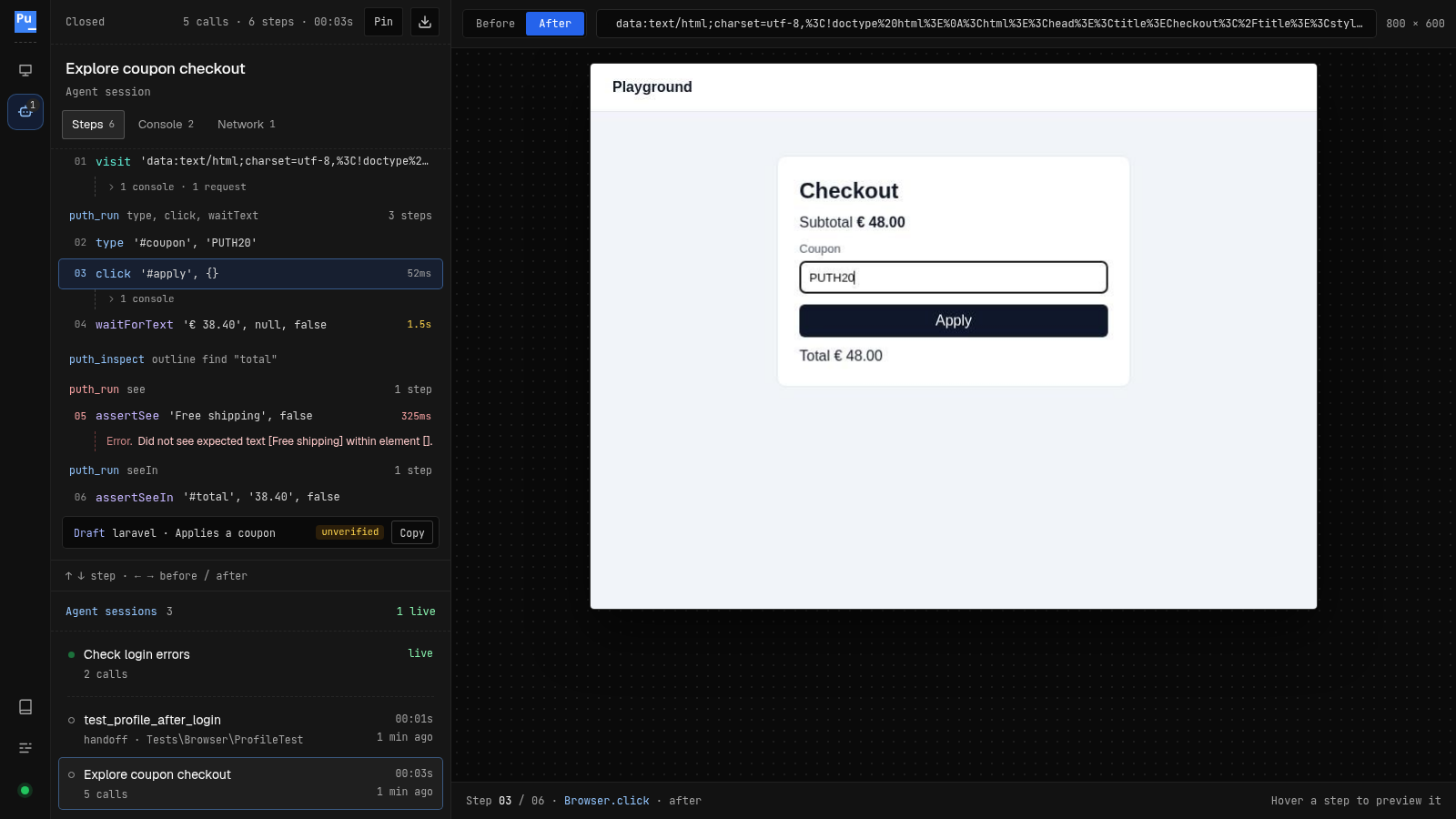
The Agents view of the GUI lists agent sessions, live ones first, and tests an agent took over. A session shows its steps grouped by tool call, with failed steps, console output and requests where they happened, and the drafts it exported next to the steps they were made of. The server leaves out what it does for itself, such as reading the page outline. Follow keeps the newest step selected while a session runs. Closed sessions stay listed for ten minutes, longer if you pin them.
Lifecycle
- Sessions record with snapshots enabled and have portal and detours disabled. To use the portal, take over a test.
- Operations of one session run one at a time, separate sessions run concurrently. Send calls one after the other if their order matters.
- A session closes when the MCP server shuts down, and after 30 idle minutes.
- An operation has 30 seconds to finish. If it does not, its state is unknown, so the session is closed rather than left in an unknown state.
- The server only drives sessions it created and tests that offered a handoff. It can read other contexts, but can not act on them.
Test drafts
puth_export builds a draft from the passed steps of a session, or from the ones you select with steps. Inspections and screenshots are evidence, not test steps.
- Explicit assertions are kept, and nothing is inferred. A workflow without assertions is reported, because that test would verify nothing.
TODOcomments list what the draft can not know, such as data the session relied on, and selectors weaker thanputhordata-testidattributes. Values typed into credential fields are replaced by thePUTH_TEST_SECRETenvironment variable.
This repository runs exported drafts through its real test runners in docker/dev/test-mcp-drafts.sh, and checks that a wrong assertion fails. docker/dev/test-mcp-handoff.sh does the same for taking over a Laravel test.